Tuesday, 29 October 2013

BBM For Android 2.3 Ginger Bread Now Available [Download it Now

Wow, this is gud news for android users who thier android version is not up to date cos the previous bbm launched can only work for 4.2 jellybean and above..


BlackBerry Messenger for Android 2.3.6 Gingerbread Tested & Working On Xperia Neo With 2.3.4 Version etc. Phones [ARMv7] Download it Here

Try this one... Download it Here [Different file, if above didnt work/have a bug].

This file worked on gingerbread 2.3.4 should worked on 2.3.6 too Download > Install > Open > Register > Wait Activation Email >It Takes 1-2 Days > Open BBM > Create BB ID > Sign Up > Ready

Do u have a Bug while trying to install ? Try this : "its for armv7......... but u can test for galaxy y by copying libs inside bbm in folder lib/armeabi-v7a to system/lib"

Extract this to your system/lib If still not working, try not to extract the folder, try extract only file inside armeabi-v7a to system/lib *e.g : "libbbmcore.so"

Tested b4 and it WORKED on Xperia Neo Android 2.3.4

This app seems to have a lot of errors, please wait the developer update this app, thanks for your attention, and please dont spam at this blog, i hope you understand.

Enable USB Dubugging on Android phones

The USB debugging mode in Android phones allows user to connect their Android devices to their computer to use with Android SDK. and allow enter reaction between computer and phones
Whenever you want to install custom ROMs on your Android devices, you will need to have debugging mode enabled on your Android devices. The option is available in almost all Android smartphones and tablets but it is not enabled by default and you will need to manually enable it.
so In this post you will learn how to enable USB debugging mode in Android 4.0 (ICS) and Android 2.3 Gingerbread.
Android 4.0 Ice Cream Sandwich (ICS):
  • Open Settings
  • Go to Developer Options check USB debugging from there.
Android 2.3 Ginger bread
  • Open Settings
  • Go to Applications –> Development
  • From there check USB debugging option
That’s it. You are done. share and like comment if have probem

upgrade HTE desire tp 4.2 jerry bean custom Rom

Welcome back HTC Desire HD users rejoice as you have got chance to try Android 4.2 Jelly Bean AOSP Custom ROM on your HTC Desire HD. Though HTC has not even released official Android 4.0 ICS update for HTC Desire HD but thanks to developers for the custom


handphone
It is worth mentioning not all the feature of HTC Desire HD won’t work properly when updated to this AOSP Android 4.2 Custom ROM. Before we proceed, make sure:
  1. You have installed your HTC Desire HD USB drivers on your PC.
  2. You need to enable USB debugging mode which is deactivated by default.
  3. You smartphone should have 70-80% charge remaining.
  4. Your HTC Desire HD must be rooted.
  5. Last but not least, backup your important data like Call logs, SMS and other data in stored in phone memory so in case if anything goes wrong, your data is not hurt.
Once you have fulfilled the above requirements, you can proceed with the tutorial.

How to Update HTC Desire HD to Android 4.2 Jelly Bean Custom ROM

Step 1) Download Android 4.2 AOSP Trainwreck Jelly Bean Custom ROM.
Step 2) Connect your Desire HD USB to your computer using the USB cable.
Step 3) Copy the downloaded Android 4.2 ROM.zip file to your SD card.
Step 4) Turn off your phone and then turn it in again in the bootloader mode by pressing and holding the Volume Down + Power buttons.
Step 5) Now follow the on-screen instructions and select BOOTLOADER and then go to RECOVERY.
Step 6) Once your smartphone is in ClockworkMod recovery, browse for o the file we have just added to SD card and press the power button to select it.
Step 7) Press again the power button & select “choose zip from sdcard”.
Step 8) Navigate to Android 4.2 ROM.zip file and select it using power button. Confirm the installation on the next screen and the installation procedure should start now.
Step 9) Once installation is completed, go to “+++++Go Back” and reboot the phone.
Your phone will now boot for the first time in Android 4.2 Jelly Bean, so it might take some time on first boot, however no need to worry since it is normal. share and like if it helps

Thursday, 24 October 2013

BBM for Android and ISO officially lunched!!!!

BBM For Android and iPhone Was Launching Yesterday

Update
Its been exactly a month today that BBM failed to launch on the Android platform.

People have waited for what it seems like
ages but now the wait is over.

BBM for Android and iPhone is ready for launch today.


In other to avert what happened the last
time, the launch of BBM for android and
iPhone is taking a different stride due to
the high volume of people that would want
to download this app, however, the procedure below will get you your BBM app.

'BBM Roll Out Details:'

Download BBM – the easiest way is to visit
BBM.com from your Android or iPhone browser*

Once you install the app, open it, and enter
your email address to hold your spot in line, they will email you as soon as you reach the front of the line and can start using BBM

If you are among the millions that took the
time to sign up at BBM.com, you can start
using BBM immediately without waiting in
line.* If you didn’t sign up in advance,
don’t worry – BlackBerry is focused on
moving millions of customers through the
line as fast as possible.

BBM app is already showing up in the
Google-Play-Store and also for Apple-App-store . So keep checking www.bbm.com for when you can download at your region or
country, however, it will definitely land today but may be up to 3 days before it moves to Africa completely.

If you are like me and you can't wait, grab
the download from HERE for Android and HERE for iPhone.

Etisalat PC free browsing tweak

MY FELLOW VISITORS  I WANT TO LET YOU GUYS KNOW THAT ETISALAT PC FREE BROWSING TWEAK IS OUT..


Ip=>180.242.68.35


Port:- 80


APN:- etisalat


Pass&Username:- wap


Homepage:- anything


How Can I Use It On
PC?


=>Open your firefox


=>Go to options


=>Advance


=>Network


=>Click on settings


=>Manual
configuration and
enter the ip and port
same as above.


You can equally
configure it with your
internet download
manager For speedy
download
If it is slow.


If you have a modem,
configure your modem
and it will carry all
applications.


::Am flexing this pc tweak right now,if your's doesn't work for you,i advice you to go river go wash ya head.....

2go.@.chibuike1098

::ENJOY PALS !

How to get 5MB on MTN for #5 only


It Is Well Known That You Can Kindly Subscibe For 5mb By Just 5naira,Only on MTN PULSE Daily

But Seems It is Not Working These Days;

SOLUTION
=========
If You Are 0n MTN PULSE,Send *406*1# To Opt-in For The Service,Any time u wish

But If U want To "OPT-OUT" U MUST SEND D OPT-OUT CODE{*406*2#}BY "11:59PM"

Then You Can Opt-in anytime You want..To be Receiving it Daily,Use The Same Method.

Sunday, 20 October 2013

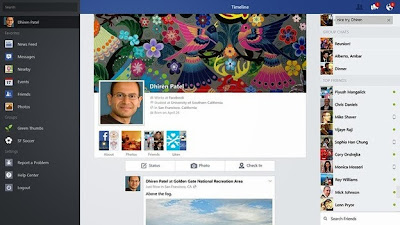
Early Today We Posted How To Update Windows 8.1 Click Here If You Missed It, Now we'll be dishing out Tip on Facebook Official Windows 8.1 Application Free Download


Facebook has already started customizing its web layout to provide that clutter free look which we posted earlier. Well possibly we won't get the same look as mentioned in few design layouts but still it has started modifying its layout and soon we will be a getting unified look that will be same for windows apps, iOS and Android phone and even the online layout.

So now facebook has already released its Windows 8.1 app after this Windows was officially announced. So now this app released for Windows 8.1 platform looks pretty similar to what design has already been demonstrated by facebook in above posts.

So you will be getting all those sliding and browsing features on the left, so by sliding you will see all hose features, on the right chat will dazzle and you can easily pick any of your friend and start chatting with them easily.


So now your photos looks much more awesome with this above light-box effect you could see, well you can Like and Comment straight away. You can even have group conversations and then sharing all those files and stuff can be done easily too.

Download It Here

You will even get all those notifications and updates on your start screen, so you won't miss any urgent or awesome update by any of your friend. So now obviously you will need Windows 8.1 installed in order to get this app downloaded to your computer.

So now grab the Windows 8.1 and then just download the app from the links given above and then install it on your Windows to get that awesome FB experience.

::. Hope This Help? If Yes Kindly Hit The Share Link Above .::